The Essential Guide to Fleet Management Software Integration
A single truck can send thousands of data points a day: location, speed, fuel level, engine hours, cargo temperature. The problem is that this data often sits in separate systems. The tracking platform knows where the truck is, the fuel card provider knows what was paid at the pump, and the ERP knows which order the truck is carrying, but none of them talk to each other. Fleet management software integration brings this data together. In this guide, we’ll explain how integration works, where it makes the biggest difference, and how to roll it out step by step.
How Fleet Management Integration Works
At its core, fleet management software integration lets different systems share data automatically, so no one has to copy figures from one screen to another.
There are two main ways to do it. The first is a pre-configured integration. Many software providers offer ready-made connectors to popular tools, such as fuel card services or accounting software. You switch them on, enter a few settings, and the data starts flowing. This is quick and needs little technical work, but you’re limited to the connections the provider has already built.
The second is a custom integration using an API (Application Programming Interface). An API is a secure bridge between two systems. It defines what data one system can request from the other and in what format. For example, your transport management system can use an API to ask your fleet management software for each vehicle’s current location every few minutes, without anyone lifting a finger. Custom integrations take more effort to set up, but they can connect almost any systems you use.
Key Types of Fleet Management Integrations
Telematics data becomes much more valuable when it’s linked to the rest of your business. These integrations usually deliver the fastest results.
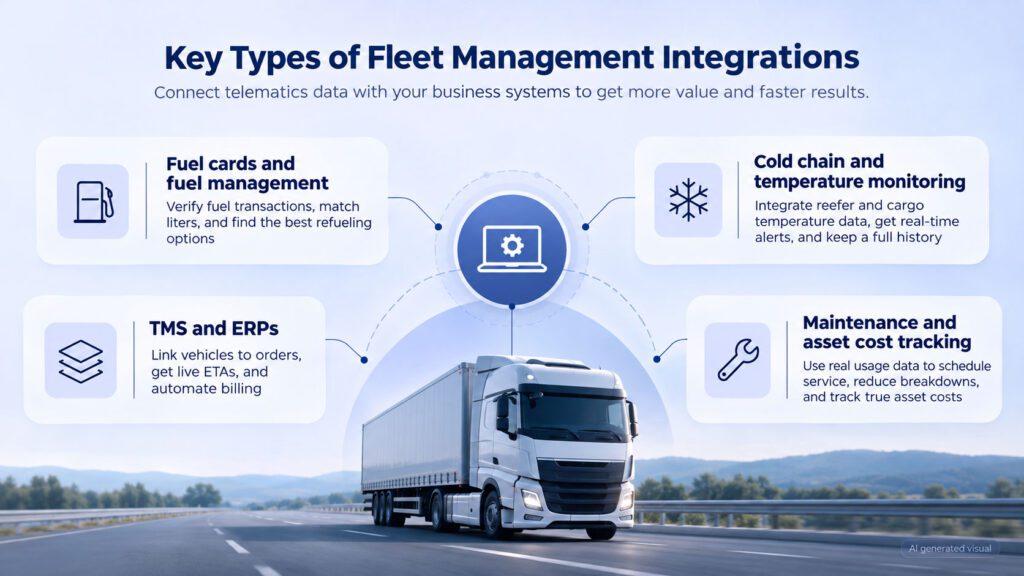
1. Fuel Cards and Fuel Management
Fuel is one of a fleet’s highest costs, and fuel card fraud is surprisingly common. By combining fuel card transactions with GPS data, you can check whether the vehicle was actually at the station when the card was used. Add accurate fuel-level data from the vehicle’s CAN bus or a fuel-level sensor, and you can also see whether the liters paid for match the liters that went into the tank.
Integration helps before refueling too. In TrustTrack, integrated fuel cards show fuel stations on the map with current diesel prices, and when you plan a trip, it shows stations within 10 km of the route, so drivers can choose the most cost-effective place to refuel. Learn more about fuel monitoring systems.
2. Cold Chain and Temperature Monitoring
For food, pharmaceuticals, and other sensitive goods, temperature is as important as location. You can integrate data from refrigeration units, such as Thermo King reefers, or from wireless temperature sensors in the cargo area into your main fleet system. Dispatchers then get an alert as soon as the temperature moves outside the set range, so they can act before the cargo is spoiled. The recorded data also gives you a full temperature history for each shipment, which helps with regulatory compliance and customer audits. Read more about reefer monitoring.
3. Transport Management Systems (TMS) and ERPs
Connecting GPS tracking to a TMS or ERP like SAP links your vehicles directly to your orders. Dispatchers can assign jobs based on where vehicles actually are, and customers can receive live ETAs instead of rough time windows. When a delivery is completed, the system already has the time, location, and distance, so billing can be prepared automatically without drivers or office staff filling in forms.
4. Maintenance and Asset Cost Tracking
Maintenance software works best with real usage data. When you pull odometer readings and engine hours directly from the vehicle into your maintenance system, you can schedule service automatically based on how much each vehicle is actually used. That means fewer missed services, fewer unexpected breakdowns, and a longer working life for your vehicles. It also gives you a clear view of each asset’s true cost over time.
5 Steps to a Successful Fleet Integration
Integration projects can sound complicated, but breaking them into clear steps makes them much easier to manage. Done well, they can also reduce fleet management costs. Here’s a practical checklist.
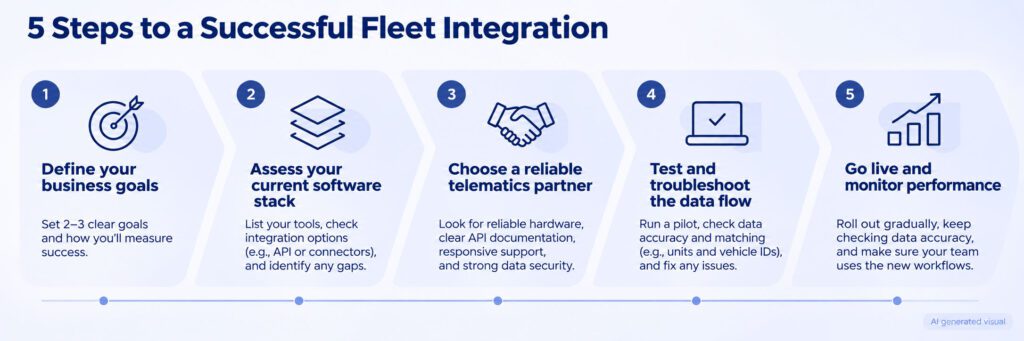
Step 1: Define Your Business Goals
Start with the problems, not the technology. Do you want to cut manual data entry, stop fuel fraud, improve delivery times, or speed up billing? Write down two or three clear goals and how you’ll measure success. These goals will guide every decision that follows and help you avoid building integrations nobody really needs.
Step 2: Assess Your Current Software Stack
Next, list the tools you already use, such as your ERP, accounting software, TMS, and fuel card provider. For each one, check whether it offers an open API or ready-made connectors, and who in your company owns it. This quick audit shows where integration will be easy, where it will need custom work, and where an outdated tool might need replacing.
Step 3: Choose a Reliable Telematics Partner
Your telematics provider is the foundation of the whole setup, so choose carefully. Look for reliable hardware, clear technical documentation, and support that responds when you need it. Security matters just as much. Ruptela devices, for example, use TLS 1.2 encryption to protect data on its way from the vehicle to the platform. Ask potential partners how their API works and how other customers use it.
Step 4: Test and Troubleshoot the Data Flow
Before going live, run a pilot in a test environment, often called a sandbox. Connect a small number of vehicles and check that the data arrives correctly: that units match, that vehicle IDs line up between systems, and that nothing is lost or duplicated. Fixing mapping errors at this stage is far easier than cleaning up wrong data later.
Step 5: Go Live and Monitor Performance
Roll out the integration gradually, for example, one depot or vehicle group at a time. Keep checking data accuracy in the first weeks, and make sure dispatchers, drivers, and office staff know how to use the new workflows. An integrated fleet management system only pays off when people trust the data and use it every day.
Common Integration Challenges (and How to Overcome Them)
Integration can seem daunting, especially for fleets that have grown over many years. These are the most common hurdles:
- Legacy systems. Older software may not have an API at all. In that case, consider whether a simple file export would cover your needs for now, or whether it’s time to replace the tool.
- Mixed vehicles and hardware. Fleets with different vehicle brands or existing trackers can struggle to get consistent data. Solutions like Ruptela’s CAN For ALL adapter make vehicle CAN bus data available to both Ruptela and third-party trackers, without replacing existing hardware.
- Data security. Sharing data between systems raises fair questions about privacy. Choose providers that encrypt data, carefully control access, and comply with GDPR.
- Compatibility issues. Systems often describe the same thing in different ways. Agree on data formats early and test them during the pilot.
In most cases, the answer is the same: choose systems with open APIs and work with experienced partners who have done similar projects before.
Optimize Your Fleet Ecosystem with Ruptela
At Ruptela, we know that a modern fleet is only as strong as the connections between its systems. Our GPS tracking devices read data directly from the vehicle’s CAN bus and work with a wide range of accessories, making them a strong choice for fuel monitoring and control, as well as reefer monitoring. The TrustTrack platform adds integrated fuel cards and public APIs for both end users and service providers, with built-in documentation and API key generation. You can use raw or summarized data in your own tools, and the data streams continuously, so your fleet management software becomes part of one connected workflow.
Want to connect your existing systems with reliable telematics data? Contact our experts to discuss how fleet software integration could work for your business.