CAN Logging, Reinvented: No Adapters, No Third-Party Software, No File Shuffle
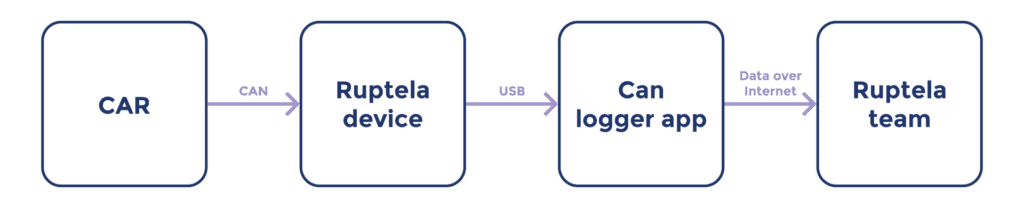
Working with CAN bus data has meant using several tools at once: dedicated hardware to tap the CAN bus, separate non specialized software to capture, and email to send it all in. CAN Logger brings the entire process into one application. Built specifically for Ruptela hardware, this desktop app functions as a CAN bus data logger, taking you from “plug in the device” to “logs submitted and tracked” without leaving the application.
Read CAN data straight from your Ruptela tracker
The problem. Reading CAN bus usually means buying and configuring a separate CAN interface and its own software stack, just to see the bus.
With CAN Logger, the Ruptela tracker becomes the interface. Once connected over USB, the device streams CAN data directly into the app, with no extra adapters, no third-party capture software, and no additional licensing. Plug in the tracker you already use in the field and start reading the bus immediately, with the exact hardware your deployment runs on. As a built-in CAN bus data logger, the application lets you capture and inspect data without additional tools.
Compare CAN lines side by side
The problem. Which bus line should I log? Are there differences, or are they all the same? A few quick scans and the doubt is gone, and a return trip to the vehicle may be saved.
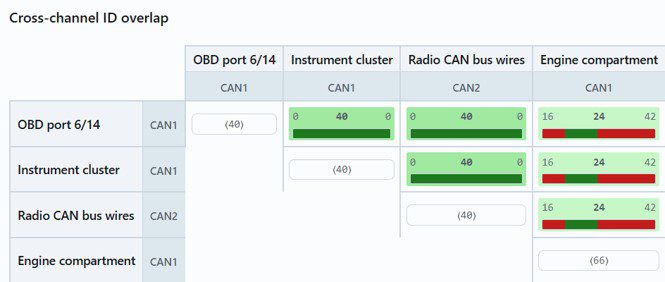
CAN Logger’s discovery and comparison tool scans each CAN line and lays them out in a side-by-side comparison matrix, so you can see at a glance how they relate. For any pair you instantly see:
- Shared IDs – what both lines have in common,
- Unique IDs – what’s present on one line but not the other,
- A similarity score to gauge how alike two lines are.
It’s a fast way to see where lines differ. When they don’t, you catch it up front and can log several lines in one visit, rather than discovering the gap later and having to go back.
Connect with confidence
The problem. You don’t find out about wiring or power issues until you’re deep into a session and the data looks wrong.
- Voltage check on connect flags power problems before you start.
- Automatic baud-rate detection and support for both CAN buses get you connected without guesswork.
- CAN verification test at the beginning of connection

Capture data the structured way
The problem. Raw logs pile up as nameless files with no context about the vehicle, device, or test.
- Guided logging sessions tie every capture to its vehicle and connection details.
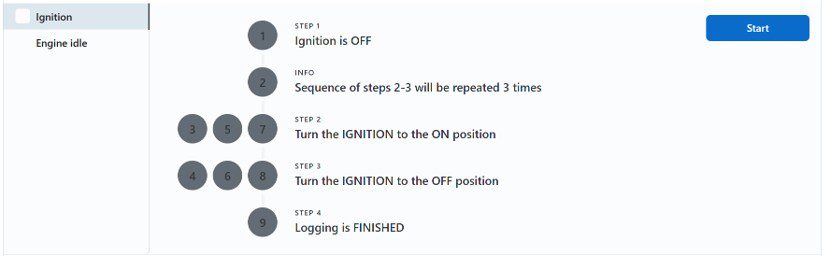
- Scenario execution walks you through a repeatable set of diagnostic steps, recording exactly what was tested. Logs are saved in a clean, organized structure, making sessions easy to find and revisit.
Submit logs and tickets without the file shuffle
The problem. Getting data to the right people means zipping files, attaching them to email, and chasing threads.
- Submit logging sessions and tickets directly from the app.
- End-to-end tracking starts from the moment you hit submit, with no lost files and no guessing about status.
- Photo attachments add real-world context to any submission.

Get started
Interested in using CAN Logger? Contact support@ruptela.com to request access.